

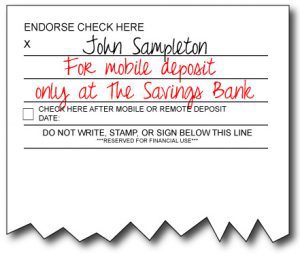
When depositing a check through The Savings Bank Mobile App, effective immediately, please make sure you use the endorsement listed below:
Your signature AND “For mobile deposit only at The Savings Bank” is required for all checks deposited via TSB Mobile Deposit.
If you deposit a check without this mandatory endorsement, the check may be rejected. You will receive an email notification that your “transaction was rejected during the review” and “Reject Reason: Missing Restrictive Endorsement” at the email address on file for your TSB account.
Is this endorsement required on all checks I deposit at TSB?
This endorsement only applies to mobile deposits and is not required when you visit the bank.
Why is this endorsement required? It’s so much longer than a regular endorsement.
We know the endorsement is long, and we apologize for any inconvenience this may cause you. This longer endorsement is being used to protect your deposits so that items are not accidentally presented a second time at another bank when they have already been deposited via TSB Mobile Deposit.
Can I use the check box in the endorsement area rather than using this new endorsement?
No, the mobile deposit check box and space for the date are for your record-keeping and do not meet the requirement for mobile deposits
Updated as of March 2026
Apple – Minimum iOS Versions Supported – iOS 17*, iPadOS 17*
- iPhone XR, XS, XS Max, 11, 11 Pro, 11 ProMax, SE (2nd Gen), 12, 12 Mini, 12 Pro, 12 Pro Max, 13, 13 Mini, 13 Pro, 13 Pro Max, 14, 14 Plus, 14 Pro, 14 Pro Max, 15, 15 Plus, 15 Pro, 15 Pro Max, 16, 16 Plus, 16 Pro, 16 Pro Max, SE (2022), 17, iPhone Air, 17 Pro, 17 Pro Max, and 17e.
- IPad 6th Gen (2018), 7th Gen (2019), 8th Gen (2020), 9th Gen (2021), 10th Gen (2022),11th Gen (2025), Air 3d Gen (2019), 4th Gen (2020), 5th Gen (2022), Air 11” 6th Gen (2024), Air 13” 1st Gen (2024), Air 11″ 7th Gen (2026), Air 13″ 2nd Gen (2026), Air M3 Chip (2025), Pro 12.9” 2nd Gen (2018), Pro 11” 1st Gen (2018), Pro 11” 2nd Gen (2020), Pro 11” 3d Gen (2021), Pro 12.9” 4th Gen (2020), Pro 11” 4th Gen (2022), Pro 12.9” 5th Gen (2021), Pro 12.9 6th Gen (2022), Pro 11” 5 Gen (2024), Pro 13” 7th Gen (2024), Mini 5th Gen (2019), Mini 6th Gen (2021), and Mini 7th Gen (2024).
* Apple devices that support a maximum OS of iOS 15/iPadOS 15 or iOS 16/iPadOS 16 will continue to be able to download apps from the App Store. Any defects that are exclusive to iOS 15/iPadOS 15, iOS16/iPadOS 16 OS, and/or devices that only support OS versions below iOS 17 will not be addressed.
Android – Minimum Version Supported – Android 12.0**
- Google Pixel 5, 5 XL, 6, 6a, 7, 7 Pro, 8, 8a, 9, 9 Pro, 9 Pro XL, 9 Pro Fold, 10, 10 Pro, and 10 Pro XL.
- Motorola Edge 5G UW (2021), 40, 50 Fusion, Moto G Play (2024), G Power (2022), G Power 5G (2024), G Stylus (2024), G 5G (2022), G34 5G (2024), and G53 5G.
- Samsung Galaxy A03s, A11, A12, A13 5G, A14 5G, A15 5G, A16 5G, A23 5G, A32 5G, A35, A51, A52 5G, A53, A54 5G, A71 5G, M13 5G, Note 10, Note 10+, Note 20 5G, Note 20 Ultra, S10, S10E, S10+, S20 5G, S20+, S20 FE 5G, S20 Ultra 5G, S21 5G, S21+ 5G, S21 FE 5G, S21 Ultra, S22 5G, S22+ 5G, S22 Ultra, S23, S23 Plus, S23 Ultra, S24, S24+, S24 Ultra, S24 FE, S25, S25+, S25 Ultra, S25 FE, S26, S26+, S26 Ultra, Z Fold 6, Fold 7, Z Flip 3 5G, Z Flip 5, Z Flip 6, Flip 7, Z Flip 7 FE
- Samsung Tablets Tab A9 Plus, Tab S6 Lite, Tab S7, Tab S7 FE, Tab S10 Ultra, S11, S11 Ultra
from Google Play. Any defects that are exclusive to Android 11 and/or devices that only support OS
versions below Android 12 will not be addressed.
Hardware, Browsers, and Channel Support
- Android “Developer options” settings, including USB Debugging, are not supported
- Jailbroken/rooted devices and MITM interception are not supported
- The latest versions of Chrome and Safari browsers are supported. Beta versions are not supported
Supported App Stores
- Apple App Store
- Google Play
Network Support
Mobile Banking only supports TLS 1.2 for app communications. Any device or browser that does not support TLS 1.2 will not be able to connect to Mobile Banking services.
The Mobile banking products can operate on any unrestricted TCP/IP data network. Operation on restricted networks (e.g., where a firewall might be in place) is not guaranteed.
The Mobile Banking product supports the Tier 1 carriers in the U.S., including:
- AT&T©
- Verizon©
- T-Mobile©/Sprint©
- US Cellular©
Mobile banking support for non-Tier 1 carriers depends on the contractual agreement between the SMS gateway provider (aggregator) and the individual carrier.